MomenでAIナレッジベースを構築する

1. データモデリング
データベースはアプリケーションの基盤です。Momenはビジュアルエディタで定義されたスキーマに基づいて、バックエンドインフラストラクチャを自動的に管理します。
スキーマの作成
Dataページに移動し、Data modelタブの下にデフォルトスキーマが表示されます。AIナレッジベーステンプレートには以下の主要テーブルが含まれています: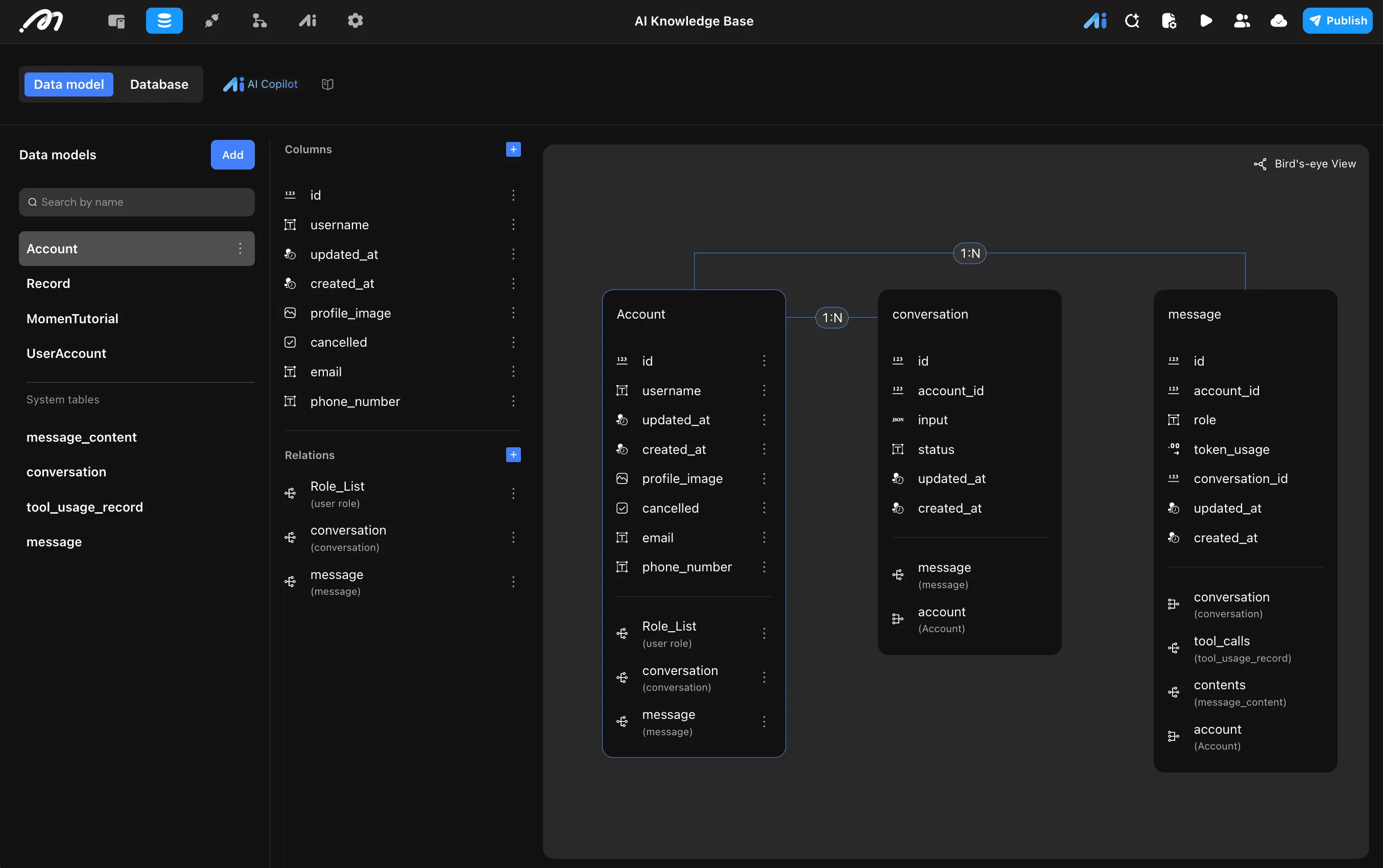 1. Usersテーブル(Account)
このテーブルは認証、ログインセッション、ユーザープロファイルを管理します。Momenによって事前設定されています。
- id(ID):一意識別子
- username(Text):ユーザーの表示名
- updated_at(Date/Time):最終更新タイムスタンプ
- created_at(Date/Time):アカウント作成タイムスタンプ
- profile_image(Image):ユーザーのアバター
- cancelled(Boolean):アカウントキャンセルステータス
- email(Text):ユーザーのメールアドレス
- phone_number(Text):ユーザーの電話番号
- リレーション: Role_List, conversation, message
ユーザーからの個別のチャット記録/質問を保存します。
- ID(ID):一意識別子
- Created_at(Date/Time):レコード作成タイムスタンプ
- Updated_at(Date/Time):最終更新タイムスタンプ
- Context(Text):レコードのコンテキストまたは内容
- Role(Text):'user'と'assistant'を区別
- Account Id(Relation):Usersテーブルへのリンク
- Question_Type(Text):質問の種類
- リレーション: user(User Account)
AIが参照するナレッジベースコンテンツを保存します。
- ID(ID):一意識別子
- Created_at(Date/Time):コンテンツ作成タイムスタンプ
- Updated_at(Date/Time):最終更新タイムスタンプ
- Title(Text):ナレッジ記事のタイトル
- index_in_title(Text):記事のインデックス参照
- Content(Text):実際のナレッジベースコンテンツ
拡張ユーザープロファイル情報。
- ID(ID):一意識別子
- Created_at(Date/Time):作成タイムスタンプ
- Updated_at(Date/Time):最終更新タイムスタンプ
- リレーション: records(Record)
個別のチャットセッションのメタデータを保存します。
- id(ID):一意識別子
- account_id(Relation):Usersテーブルへのリンク
- input(Text):チャットセッションのタイトルまたは最初の入力
- status(Text):会話の現在のステータス
- updated_at(Date/Time):最終更新タイムスタンプ
- created_at(Date/Time):作成タイムスタンプ
- リレーション: message, account
セッション内の個別のチャットメッセージを保存します。
- id(ID):一意識別子
- account_id(Relation):Usersテーブルへのリンク
- role(Text):'user'と'assistant'を区別
- token_usage(Number):このメッセージのトークン数
- conversation_id(Relation):Conversationsテーブルへのリンク
- updated_at(Date/Time):最終更新タイムスタンプ
- created_at(Date/Time):作成タイムスタンプ
- リレーション: conversation, tool_calls, contents, account
メッセージ生成中に実行されたAIツール/関数呼び出しを追跡します。
- id(ID):一意識別子
- name(Text):呼び出されたツールの名前
- call_id(Text):ツール呼び出しの一意識別子
- type(Text):ツールの種類
- request(Text):ツールに送信されたリクエストペイロード
- response(Text):ツールから受信したレスポンス
- message_id(Relation):Messagesテーブルへのリンク
- updated_at(Date/Time):最終更新タイムスタンプ
- created_at(Date/Time):作成タイムスタンプ
- リレーション: message
メッセージのマルチモーダルコンテンツを保存します。
- id(ID):一意識別子
- type(Text):コンテンツタイプ(text, image, video, file, json)
- text(Text):テキストコンテンツ
- image(Image):画像コンテンツ
- json(Text):JSON構造化コンテンツ
- message_id(Relation):Messagesテーブルへのリンク
- updated_at(Date/Time):最終更新タイムスタンプ
- created_at(Date/Time):作成タイムスタンプ
- video(Video):動画コンテンツ
- file(File):ファイル添付
- リレーション: message
2. ビジュアルインターフェースの構築
MomenはFlexboxベースのレスポンシブレイアウトシステムを使用しています。AIナレッジベーステンプレートには、デスクトップとスマートフォン向けの事前構築されたレスポンシブビューが含まれています。
ページ構造
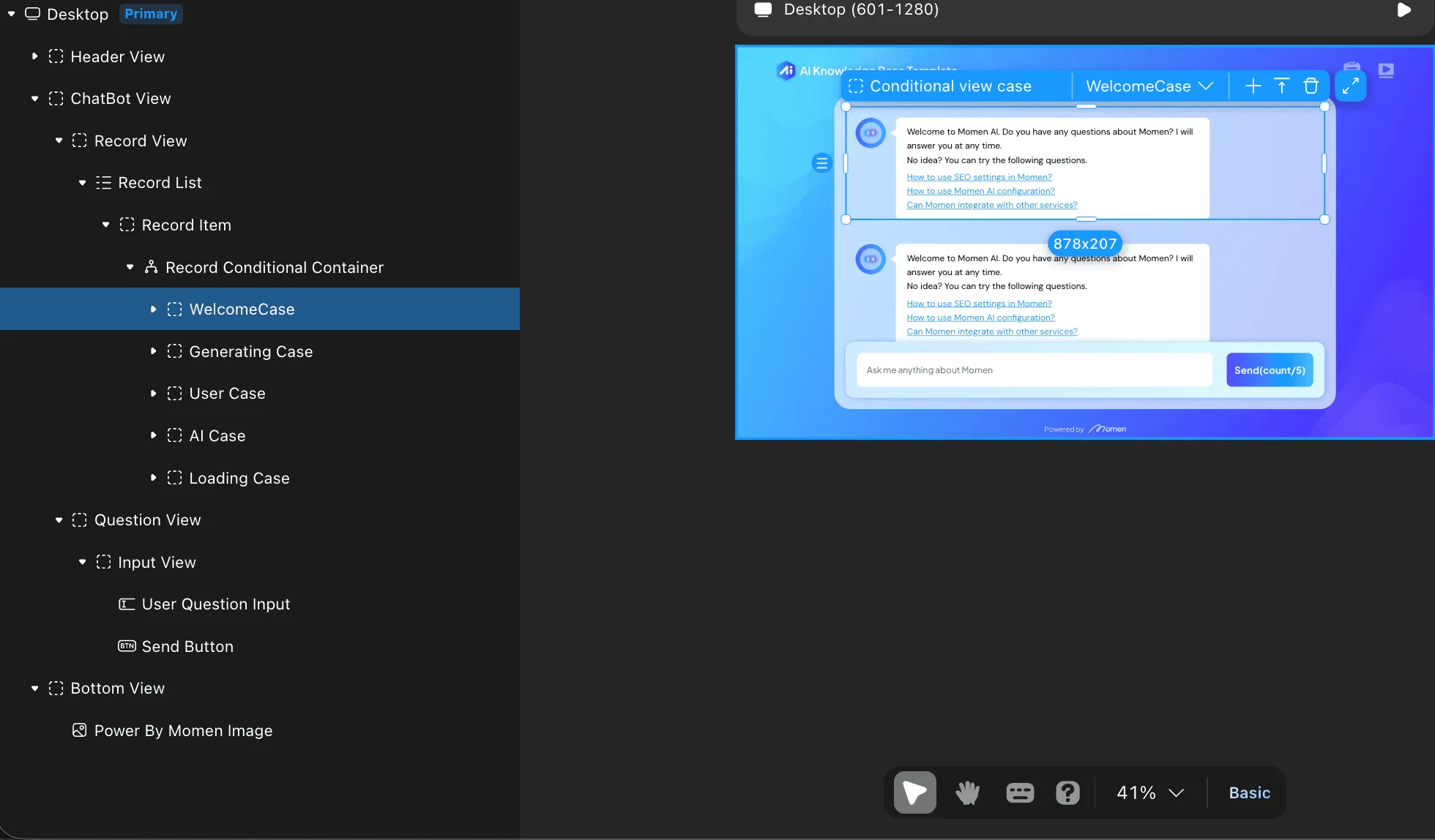
Chat Botページは以下のコンポーネント階層で構成されています:
デスクトップ(プライマリ)├── Header View │ ├── Template Logo │ └── Custom View │ ├── docs_View (docs Image_Copy, Image, Text) │ └── video_View (video Image, Image, Text) ├── ChatBot View │ └── Record View │ └── Record List │ └── Record Item │ └── Record Conditional Container │ ├── WelcomeCase │ │ ├── Custom View (AI Image) │ │ └── WelComeView │ │ ├── WelCome Text │ │ ├── Question1 │ │ ├── Question2 │ │ ├── Question3 │ │ └── Image │ └── Generating Case │ ├── User View (AI Image) │ ├── Record Detail View (Generating Text) │ └── Image └── Bottom View
├── Header View
├── ChatBot View
└── Bottom View
レイアウトの基礎
Container - Viewコンポーネントを使用してページを構成します。
- Direction: 垂直スタックには下矢印、水平整列には右矢印を選択。
- Alignment: Stack、Space-between、Evenly、またはSpace-aroundを選択。
ChatBot Viewコンポーネント
 1. Record List
Container - Listコンポーネントを含み、Recordテーブルにバインドされています。- データソース: 現在のユーザーのユーザーIDでレコードをフィルタリング(In-Page Data -> Page Variable -> userid)
Record Conditional Containerを使用してウェルカム状態とチャット状態を切り替えます。
会話が開始されていない場合に表示:
- AI Image: アシスタントのアバター
- WelCome Text: 挨拶メッセージ
- Question1, Question2, Question3: おすすめのスターター質問
アクティブな会話中に表示:
- User View: アバター付きでユーザーのメッセージを表示
- Record Detail View: 生成アニメーション付きでAIのレスポンスを表示
- Generating Text: ストリーミングテキスト出力
- ユーザーメッセージの入力フィールド
- 文字数表示付きの送信ボタン
3. AIエージェント設定
Momenでは「Bring Your Own Model」(BYOM)またはネイティブAIポイントの使用が可能です。AIナレッジベースでは、Momen Tutorialコンテンツに基づいて質問に答えるエージェントを設定します。
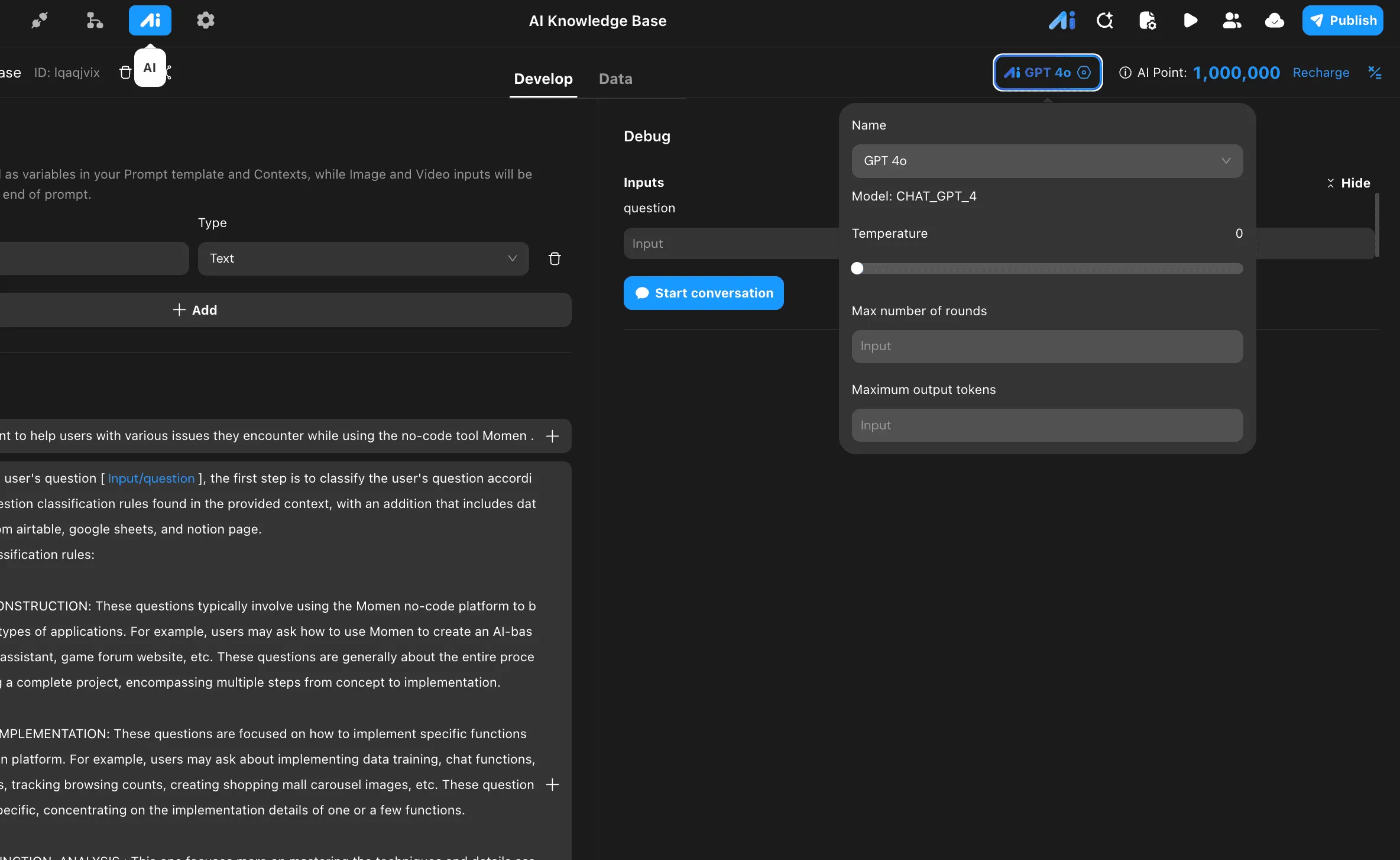
エージェントセットアップ
- AIタブに移動し、新しいエージェントを作成します。
- Name:
Momen AI knowledge base - Model: ドロップダウンから
GPT 4oを選択。 - Temperature: 一貫した決定論的なレスポンスのために
0に設定。
入力設定
エージェントに渡される入力変数を定義します:Name: question、Type: Text
テキストベースの入力はプロンプトテンプレートとコンテキストで変数として使用され、画像と動画の入力はプロンプトの末尾に自動的に追加されます。
プロンプトテンプレート
プロンプトテンプレートはAIエージェントの動作とユーザー質問の処理方法を定義します。
Role:An AI assistant to help users with various issues they encounter while using the no-code tool Momen.Based on the user's question [Input/question], the first step is to classify the user's question according to the Question classification rules found in the provided context, with an addition that includes data retrieval from airtable, google sheets, and notion page. Question classification rules: PROJECT_CONSTRUCTION: These questions typically involve using the Momen no-code platform to build specific types of applications. For example, users may ask how to use Momen to create an AI-based shopping assistant, game forum website, etc. These questions are generally about the entire process of building a complete project, encompassing multiple steps from concept to implementation. FUNCTION_IMPLEMENTATION: These questions are focused on how to implement specific functions on the Momen platform. For example, users may ask about implementing data training, chat functions, login features, tracking browsing counts, creating shopping mall carousel images, etc. These questions are more specific, concentrating on the implementation details of one or a few functions. MOMENT_FUNCTION_ANALYSIS: This one focuses more on mastering the techniques and details associated with using specific functions or components in Momen. For instance, questions might pertain to configuring hyperlinks, displaying data on pages, utilizing countdown components, adding backend data, the impact of remote data, etc. These inquiries concentrate on a profound comprehension of specific implementation functions in Momen. COMPUTING_POWER: Questions in this category mainly focus on Momen platform's performance parameters, computing resources (computing power), and related costs. For example, inquiries might concern the relationship between Momen's performance and databases, the cost of AppToken, the features and limitations of Momen's basic free version (like support for payment functions, presence of watermarks), the free and paid standards of Momen AI, the contents of package upgrades (such as payment functions), Momen platform's traffic limits, whether platform usage is free, whether sample production requires payment, and Momen's overall pricing structure. COMPETITIVE_COMPARISON: These questions often involve comparisons between Momen and other no-code platforms or development tools in terms of functions, performance, pricing, etc. ERROR_MESSAGES: These questions involve specific error messages encountered while using the Momen platform. For example, users may encounter error prompts when deleting table relationships, such as missing specific properties or fields; or token limitation errors when using AI models. These questions usually require specific technical support to resolve and may indicate challenging aspects of using the platform or areas for improvement. The second step is to answer the user's question [Input/question] based on the relevant content found in the project's database.
Please write the results of the first step's question classification into the "question_type" field. Then, provide concise and accurate answers to the user's question only based on the provided knowledge base content only, with proper line breaks. If you cannot find an answer, respond with "Sorry, your question is too broad. Please try asking more specific questions." Regardless of whether you find an answer or not, include the response in the "answer" field.コンテキスト
ナレッジベースから取得されたコンテンツは、事前設定されたプロンプトと共に大規模モデルに送信され、タスクを実行するために必要な背景知識を提供します。
- Data: 1つのデータソースに接続(例:Momen Tutorialテーブル)
- API: 3つのAPIソースに接続(例:Airtable、Google Sheets、Notion)
ツール
LLMは特定のコンテキストに基づいて、ツールを使用するかどうか、およびどのツールを使用するかを自律的に決定します:
- Actionflow: カスタムアクションフローの実行
- API: 外部APIの呼び出し
- Agent: 他のAIエージェントの呼び出し
出力設定
構造化されたJSONレスポンスを受け取るために、出力タイプをStructuredに設定します:
OBJECT(2) body
  ├── STRING answer
  └── STRING question_type
この構造化出力により、Actionflowは以下を抽出できます:
answer:ユーザーに表示するAIのレスポンスquestion_type:分析とルーティング用の分類カテゴリ
4. ロジックとActionflow
Actionflowはアプリケーションの動作を定義し、UIイベントをバックエンドロジックに接続します。
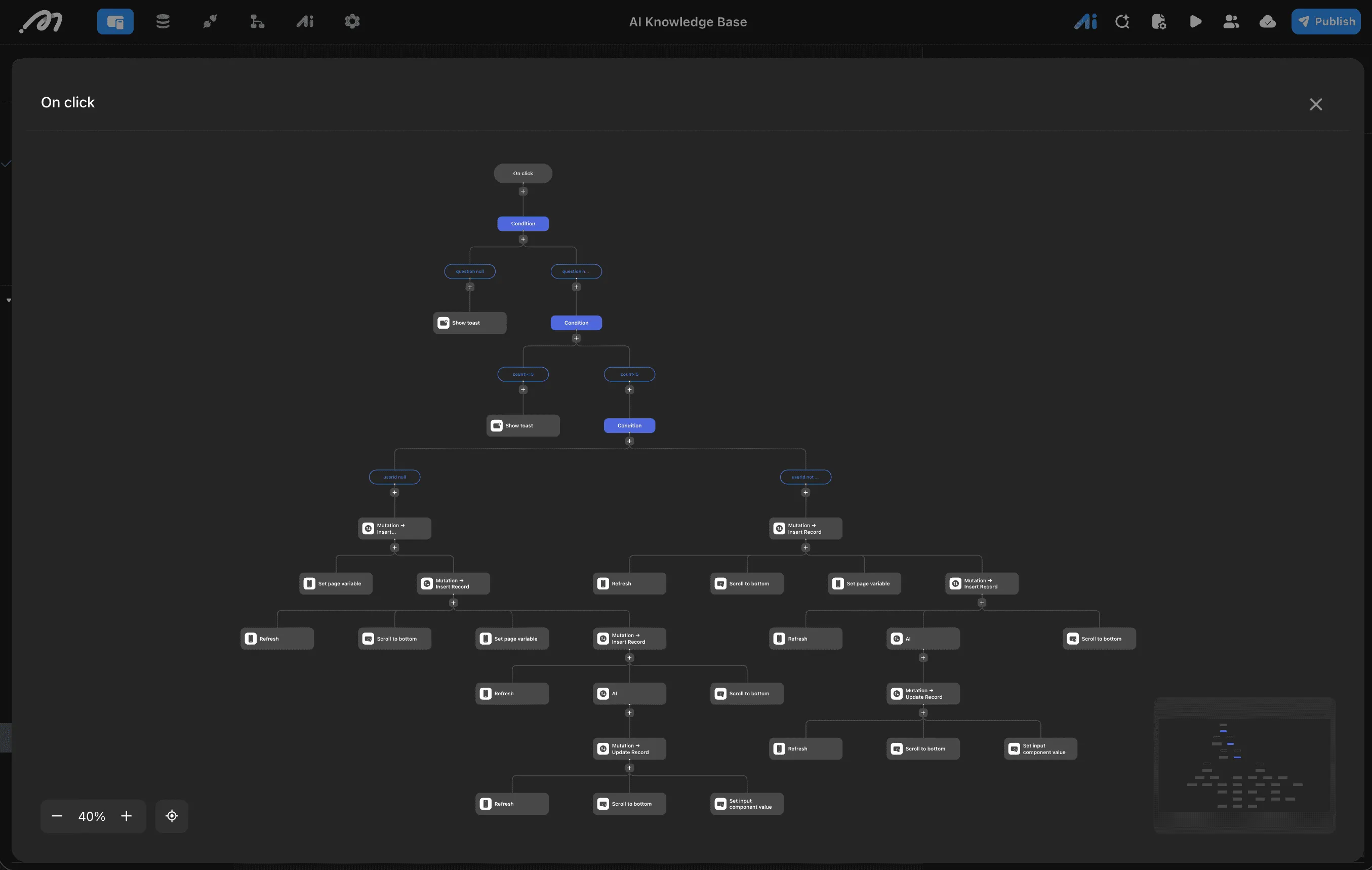
送信ボタンのオンクリックワークフロー
Bottom Viewの「Send」ボタンを選択し、On Clickイベントを設定します。完全なフローにはバリデーション、レート制限、ユーザー認証チェックが含まれます。
レベル1:入力バリデーション
On click
    └── Condition: Check if question is null
            ├── question null → Show toast ("質問を入力してください")
            └── question not null → Continue to Level 2
レベル2:レート制限
Condition: Check message count
    ├── count >= 5 → Show toast ("レート制限に達しました")
    └── count < 5 → Continue to Level 3
レベル3:ユーザー認証チェック
Condition: Check if userid is null
    ├── userid null → Anonymous User Flow
    └── userid not null → Authenticated User Flow
匿名ユーザーフロー(userid null)
ユーザーがログインしていない場合:
1. Mutation → Insert Record (Create anonymous user session)
   │
   ├── Set page variable (Store session info)
   └── Mutation → Insert Record (Save user's question)
       │
       ├── Refresh (Update record list)
       ├── Scroll to bottom (Show latest message)
       ├── Set page variable (Update state)
       └── Mutation → Insert Record (Create AI placeholder)
           │
           └── AI (Trigger AI Agent)
               │
               └── Mutation → Update Record (Save AI response)
                   │
                   ├── Scroll to bottom
                   └── Set input component value (Clear input)
認証済みユーザーフロー(userid not null)
ユーザーがログインしている場合:
1. Mutation → Insert Record (Save user's question to Record table)
   │
   ├── Refresh (Update record list)
   ├── Scroll to bottom (Show latest message)
   ├── Set page variable (Update loading state)
   └── Mutation → Insert Record (Create AI response placeholder)
       │
       ├── Refresh
       └── AI (Trigger AI Agent with question input)
           │
           └── Mutation → Update Record (Update placeholder with AI response)
               │
               ├── Refresh (Final refresh)
               ├── Scroll to bottom (Scroll to AI response)
               └── Set input component value (Clear input field)
Actionflowノードの詳細
| ノード | アクション | 説明 |
|---|---|---|
| Mutation → Insert Record | Create Data | ユーザーの質問またはAIレスポンスでRecordテーブルに新しいレコードを挿入 |
| Refresh | Refresh Data | 新しいメッセージを表示するためにRecord Listを更新 |
| Scroll to bottom | UI Action | 最新のメッセージを表示するためにチャットビューをスクロール |
| Set page variable | Set State | ローディング状態やユーザーセッションなどのページ変数を更新 |
| AI | AI Agent | 質問入力でMomen AIナレッジベースエージェントをトリガー |
| Mutation → Update Record | Update Data | AIプレースホルダーレコードを実際のレスポンスで更新 |
| Set input component value | UI Action | 送信後に入力フィールドをクリア |
| Show toast | UI Action | エラーメッセージまたは情報メッセージをユーザーに表示 |
スターター質問のクリックハンドラー
WelcomeCaseのQuestion1、Question2、Question3の場合:
On Clickイベント:- 入力フィールドの値を質問テキストに設定
- 送信ボタンと同じ送信ワークフローをトリガー
5. カスタムコード拡張
ビジュアルエディタの制限に達した場合、MomenはカスタムReactコンポーネントをサポートします。これは複雑なチャート、リッチテキストエディタ、シンタックスハイライトなどの機能に不可欠です。
開発ライフサイクル
- CLIセットアップ: Momen CLIを使用してローカルReactプロジェクトを生成。
- コーディング: 標準的なReact/TypeScriptコードを記述。
- デプロイ: コンポーネントをMomenクラウドにプッシュし、ビジュアルエディタの「Custom」ライブラリで利用可能にする。
例:Markdownレンダラー
AIレスポンスを適切にレンダリングするには、カスタムMarkdownコンポーネントがよく必要になります。
import React from 'react';
import ReactMarkdown from 'react-markdown';
import { Prism as SyntaxHighlighter } from 'react-syntax-highlighter';
import { vscDarkPlus } from 'react-syntax-highlighter/dist/esm/styles/prism';

interface MarkdownProps {
  content: string;
}

const MarkdownRenderer: React.FC<MarkdownProps> = ({ content }) => {
  return (
    <div className="markdown-body" style={{ width: '100%', fontSize: '14px' }}>
      <ReactMarkdown
        components={{
          code({node, inline, className, children, ...props}) {
            const match = /language-(\w+)/.exec(className || '')
            return !inline && match ? (
              <SyntaxHighlighter
                style={vscDarkPlus}
                language={match[1]}
                PreTag="div"
                {...props}
              >
                {String(children).replace(/\n$/, '')}
              </SyntaxHighlighter>
            ) : (
              <code className={className} {...props}>
                {children}
              </code>
            )
          }
        }}
      >
        {content}
      </ReactMarkdown>
    </div>
  );
};

export default MarkdownRenderer;
プッシュ後、このコンポーネントをセクション2で作成したList Itemにドラッグし、contentプロップをitem.contentにバインドします。
6. API統合
Momenは外部API向けのセキュアなバックエンドプロキシとして機能します。
- 設定: APIタブに移動。Base URL、Headers(例:Authorizationトークン)、Endpointsを入力。
- 使用: 任意のActionflowで
Request APIノードを追加。 - データ処理: APIからのレスポンスはActionflowの後続ステップで即座に利用可能であり、データベースへの保存やPage Statesを通じた表示が可能です。
7. デプロイ
プレビュー Previewをクリックすると一時的なビルドが生成されます。これは本番環境に影響を与えずにロジックとレイアウトのレスポンシブ性をテストするのに便利です。 公開 Publishをクリックするとアプリケーションが本番環境にデプロイされます。Momenは以下を自動的に処理します:- SSL認証
- CDNコンテンツ配信
- データベーススケーリング
プロジェクト設定で、カスタムドメイン(CNAMEレコード)を設定し、パブリックアクセスのためにアプリケーションをホワイトリストに登録できます。