Mastra: TypeScriptで強力なAIエージェントを構築する

Last updated: August 13 2025
このチュートリアルは、npx create-mastraで作成されたスキャフォールド済みの天気例をベースに、主要なMastraコンセプトを紹介しながら既存ファイルを再利用・拡張します:
- ツールとメモリを持つエージェント
zodによる型付き入出力のツール- ステップとエージェント呼び出しを持つワークフロー
- 永続的なローカルストレージ
完了すると、現在の状況を取得し、ワークフローでアクティビティを計画し、オンデマンドで温度単位を変換できる天気アシスタントが完成します。
既にあるもの
src/mastra/tools/weather-tool.ts:Open‑Meteoを呼び出して現在の状況を取得するツールsrc/mastra/agents/weather-agent.ts:OpenAIに接続されたメモリ付きエージェントsrc/mastra/workflows/weather-workflow.ts:エージェントを使ってアクティビティを計画する2ステップのワークフローsrc/mastra/index.ts:エージェントとワークフローを登録するMastraインスタンス
ここに単位変換の新しいツールと、耐久性とローカル実行のための小さな改善を追加します。
前提条件
1) .envにOpenAIキーを追加:
env
OPENAI_API_KEY=your-key-here2) 利用可能なスクリプト:
bash
npm run dev
npm run build
npm run start
このプロジェクトのコアコンセプト
- エージェント:ツールを呼び出しメモリを使用できるAI推論エンジン
- ツール:エージェント/ワークフローに公開される型付き関数
- ワークフロー:スキーマを持つステップでツールとエージェントをオーケストレーション
- メモリ:会話コンテキストを永続化する
@mastra/libsqlによるバッキング
1) 天気ツール
このツールはOpen‑Meteoを使用して現在の天気を取得し、型付きペイロードを返します。
typescript
// src/mastra/tools/weather-tool.ts import { createTool } from '@mastra/core/tools'; import { z } from 'zod'; interface GeocodingResponse { results: { latitude: number; longitude: number; name: string; }[]; } interface WeatherResponse { current: { time: string; temperature_2m: number; apparent_temperature: number; relative_humidity_2m: number; wind_speed_10m: number; wind_gusts_10m: number; weather_code: number; }; } export const weatherTool = createTool({ id: 'get-weather', description: 'Get current weather for a location', inputSchema: z.object({ location: z.string().describe('City name'), }), outputSchema: z.object({ temperature: z.number(), feelsLike: z.number(), humidity: z.number(), windSpeed: z.number(), windGust: z.number(), conditions: z.string(), location: z.string(), }), execute: async ({ context }) => { return await getWeather(context.location); }, }); const getWeather = async (location: string) => { const geocodingUrl = `https://geocoding-api.open-meteo.com/v1/search?name=${encodeURIComponent(location)}&count=1`; const geocodingResponse = await fetch(geocodingUrl); const geocodingData = (await geocodingResponse.json()) as GeocodingResponse; if (!geocodingData.results?.[0]) { throw new Error(`Location '${location}' not found`); } const { latitude, longitude, name } = geocodingData.results[0]; const weatherUrl = `https://api.open-meteo.com/v1/forecast?latitude=${latitude}&longitude=${longitude}¤t=temperature_2m,apparent_temperature,relative_humidity_2m,wind_speed_10m,wind_gusts_10m,weather_code`; const response = await fetch(weatherUrl); const data = (await response.json()) as WeatherResponse; return { temperature: data.current.temperature_2m, feelsLike: data.current.apparent_temperature, humidity: data.current.relative_humidity_2m, windSpeed: data.current.wind_speed_10m, windGust: data.current.wind_gusts_10m, conditions: getWeatherCondition(data.current.weather_code), location: name, }; }; function getWeatherCondition(code: number): string { const conditions: Record<number, string> = { 0: 'Clear sky', 1: 'Mainly clear', 2: 'Partly cloudy', 3: 'Overcast', 45: 'Foggy', 48: 'Depositing rime fog', 51: 'Light drizzle', 53: 'Moderate drizzle', 55: 'Dense drizzle', 56: 'Light freezing drizzle', 57: 'Dense freezing drizzle', 61: 'Slight rain', 63: 'Moderate rain', 65: 'Heavy rain', 66: 'Light freezing rain', 67: 'Heavy freezing rain', 71: 'Slight snow fall', 73: 'Moderate snow fall', 75: 'Heavy snow fall', 77: 'Snow grains', 80: 'Slight rain showers', 81: 'Moderate rain showers', 82: 'Violent rain showers', 85: 'Slight snow showers', 86: 'Heavy snow showers', 95: 'Thunderstorm', 96: 'Thunderstorm with slight hail', 99: 'Thunderstorm with heavy hail', }; return conditions[code] || 'Unknown'; }
2) 新規:単位変換ツール
ユーザーが別の単位で結果を要求したときにエージェントが呼び出せる温度変換ツールを追加します。
typescript
// src/mastra/tools/unit-conversion-tool.ts
import { createTool } from '@mastra/core/tools';
import { z } from 'zod';

type TemperatureUnit = 'C' | 'F' | 'K';

function convertTemperature(value: number, from: TemperatureUnit, to: TemperatureUnit): number {
  if (from === to) return value;

  // Normalize to Kelvin
  let kelvin: number;
  switch (from) {
    case 'C':
      kelvin = value + 273.15;
      break;
    case 'F':
      kelvin = (value - 32) * (5 / 9) + 273.15;
      break;
    case 'K':
      kelvin = value;
      break;
  }

  // Convert from Kelvin to target
  switch (to) {
    case 'C':
      return +(kelvin - 273.15).toFixed(2);
    case 'F':
      return +(((kelvin - 273.15) * 9) / 5 + 32).toFixed(2);
    case 'K':
      return +kelvin.toFixed(2);
  }
}

export const unitConversionTool = createTool({
  id: 'convert-temperature',
  description: 'Convert temperature values between Celsius, Fahrenheit, and Kelvin',
  inputSchema: z.object({
    value: z.number().describe('Numeric temperature value to convert'),
    fromUnit: z.enum(['C', 'F', 'K']).describe('Source unit'),
    toUnit: z.enum(['C', 'F', 'K']).describe('Target unit'),
  }),
  outputSchema: z.object({
    value: z.number().describe('Converted value rounded to 2 decimals'),
    unit: z.enum(['C', 'F', 'K']).describe('Unit of the converted value'),
  }),
  execute: async ({ context }) => {
    const result = convertTemperature(context.value, context.fromUnit as TemperatureUnit, context.toUnit as TemperatureUnit);
    return { value: result, unit: context.toUnit };
  },
});

export { convertTemperature };
3) メモリとマルチツールを持つエージェント
変換機能をアドバタイズし、LibSQLを介した永続メモリを維持するようにエージェントを拡張します。
typescript
// src/mastra/agents/weather-agent.ts
import { openai } from '@ai-sdk/openai';
import { Agent } from '@mastra/core/agent';
import { Memory } from '@mastra/memory';
import { LibSQLStore } from '@mastra/libsql';
import { weatherTool } from '../tools/weather-tool';
import { unitConversionTool } from '../tools/unit-conversion-tool';

export const weatherAgent = new Agent({
  name: 'Weather Agent',
  instructions: `
      You are a helpful weather assistant that provides accurate weather information and can help planning activities based on the weather.

      Your primary function is to help users get weather details for specific locations. When responding:
      - Always ask for a location if none is provided
      - If the location name isn't in English, please translate it
      - If giving a location with multiple parts (e.g. "New York, NY"), use the most relevant part (e.g. "New York")
      - Include relevant details like humidity, wind conditions, and precipitation
      - Keep responses concise but informative
      - If the user asks for activities and provides the weather forecast, suggest activities based on the weather forecast.
      - If the user asks for activities, respond in the format they request.
      - If the user asks for different temperature units, use the convert-temperature tool.

      Use the weatherTool to fetch current weather data.
`,
  model: openai('gpt-4o-mini'),
  tools: { weatherTool, unitConversionTool },
  memory: new Memory({
    storage: new LibSQLStore({
      url: 'file:../mastra.db', // path is relative to the .mastra/output directory
    }),
  }),
});
ヒント:メモリストアは.mastra/outputの下に永続化され、ツール、エージェント、ワークフローで共有されます。
4) ワークフロー:天気取得 → アクティビティ計画
このワークフローはすでに天気を取得し、構造化されたガイダンスでエージェントにアクティビティの計画を依頼します。
typescript
// src/mastra/workflows/weather-workflow.ts import { createStep, createWorkflow } from '@mastra/core/workflows'; import { z } from 'zod'; import { weatherAgent } from '../agents/weather-agent'; const forecastSchema = z.object({ date: z.string(), maxTemp: z.number(), minTemp: z.number(), precipitationChance: z.number(), condition: z.string(), location: z.string(), }); function getWeatherCondition(code: number): string { const conditions: Record<number, string> = { 0: 'Clear sky', 1: 'Mainly clear', 2: 'Partly cloudy', 3: 'Overcast', 45: 'Foggy', 48: 'Depositing rime fog', 51: 'Light drizzle', 53: 'Moderate drizzle', 55: 'Dense drizzle', 61: 'Slight rain', 63: 'Moderate rain', 65: 'Heavy rain', 71: 'Slight snow fall', 73: 'Moderate snow fall', 75: 'Heavy snow fall', 95: 'Thunderstorm', }; return conditions[code] || 'Unknown'; } const fetchWeather = createStep({ id: 'fetch-weather', description: 'Fetches weather forecast for a given city', inputSchema: z.object({ city: z.string().describe('The city to get the weather for'), }), outputSchema: forecastSchema, execute: async ({ inputData }) => { if (!inputData) { throw new Error('Input data not found'); } const geocodingUrl = `https://geocoding-api.open-meteo.com/v1/search?name=${encodeURIComponent(inputData.city)}&count=1`; const geocodingResponse = await fetch(geocodingUrl); const geocodingData = (await geocodingResponse.json()) as { results: { latitude: number; longitude: number; name: string }[]; }; if (!geocodingData.results?.[0]) { throw new Error(`Location '${inputData.city}' not found`); } const { latitude, longitude, name } = geocodingData.results[0]; const weatherUrl = `https://api.open-meteo.com/v1/forecast?latitude=${latitude}&longitude=${longitude}¤t=precipitation,weathercode&timezone=auto,&hourly=precipitation_probability,temperature_2m`; const response = await fetch(weatherUrl); const data = (await response.json()) as { current: { time: string; precipitation: number; weathercode: number; }; hourly: { precipitation_probability: number[]; temperature_2m: number[]; }; }; const forecast = { date: new Date().toISOString(), maxTemp: Math.max(...data.hourly.temperature_2m), minTemp: Math.min(...data.hourly.temperature_2m), condition: getWeatherCondition(data.current.weathercode), precipitationChance: data.hourly.precipitation_probability.reduce( (acc, curr) => Math.max(acc, curr), 0, ), location: name, }; return forecast; }, }); const planActivities = createStep({ id: 'plan-activities', description: 'Suggests activities based on weather conditions', inputSchema: forecastSchema, outputSchema: z.object({ activities: z.string(), }), execute: async ({ inputData, mastra }) => { const forecast = inputData; if (!forecast) { throw new Error('Forecast data not found'); } // Prefer getting the agent from the runtime, fallback to direct import for local execution const agent = mastra?.getAgent('weatherAgent') ?? weatherAgent; if (!agent) { throw new Error('Weather agent not found'); } const prompt = `Based on the following weather forecast for ${forecast.location}, suggest appropriate activities: ${JSON.stringify(forecast, null, 2)} For each day in the forecast, structure your response exactly as follows: 📅 [Day, Month Date, Year] ═══════════════════════════ 🌡️ WEATHER SUMMARY • Conditions: [brief description] • Temperature: [X°C/Y°F to A°C/B°F] • Precipitation: [X% chance] 🌅 MORNING ACTIVITIES Outdoor: • [Activity Name] - [Brief description including specific location/route] Best timing: [specific time range] Note: [relevant weather consideration] 🌞 AFTERNOON ACTIVITIES Outdoor: • [Activity Name] - [Brief description including specific location/route] Best timing: [specific time range] Note: [relevant weather consideration] 🏠 INDOOR ALTERNATIVES • [Activity Name] - [Brief description including specific venue] Ideal for: [weather condition that would trigger this alternative] ⚠️ SPECIAL CONSIDERATIONS • [Any relevant weather warnings, UV index, wind conditions, etc.] Guidelines: - Suggest 2-3 time-specific outdoor activities per day - Include 1-2 indoor backup options - For precipitation >50%, lead with indoor activities - All activities must be specific to the location - Include specific venues, trails, or locations - Consider activity intensity based on temperature - Keep descriptions concise but informative Maintain this exact formatting for consistency, using the emoji and section headers as shown.`; const response = await agent.stream([ { role: 'user', content: prompt, }, ]); let activitiesText = ''; for await (const chunk of response.textStream) { process.stdout.write(chunk); activitiesText += chunk; } return { activities: activitiesText, }; }, }); const weatherWorkflow = createWorkflow({ id: 'weather-workflow', inputSchema: z.object({ city: z.string().describe('The city to get the weather for'), }), outputSchema: z.object({ activities: z.string(), }), }) .then(fetchWeather) .then(planActivities); weatherWorkflow.commit(); export { weatherWorkflow };
5) 永続ストレージ付きMastraインスタンス
ストレージをファイルベースのLibSQLデータベースに切り替えて、評価/テレメトリ/メモリが実行間で永続化されるようにします。
typescript
// src/mastra/index.ts
import { Mastra } from '@mastra/core/mastra';
import { PinoLogger } from '@mastra/loggers';
import { LibSQLStore } from '@mastra/libsql';
import { weatherWorkflow } from './workflows/weather-workflow';
import { weatherAgent } from './agents/weather-agent';

export const mastra = new Mastra({
  workflows: { weatherWorkflow },
  agents: { weatherAgent },
  storage: new LibSQLStore({
    // Persist to local sqlite db under .mastra/output
    url: 'file:../mastra.db',
  }),
  logger: new PinoLogger({
    name: 'Mastra',
    level: 'info',
  }),
});
6) 試してみる
開発サーバーを起動します:
bash
npm run dev
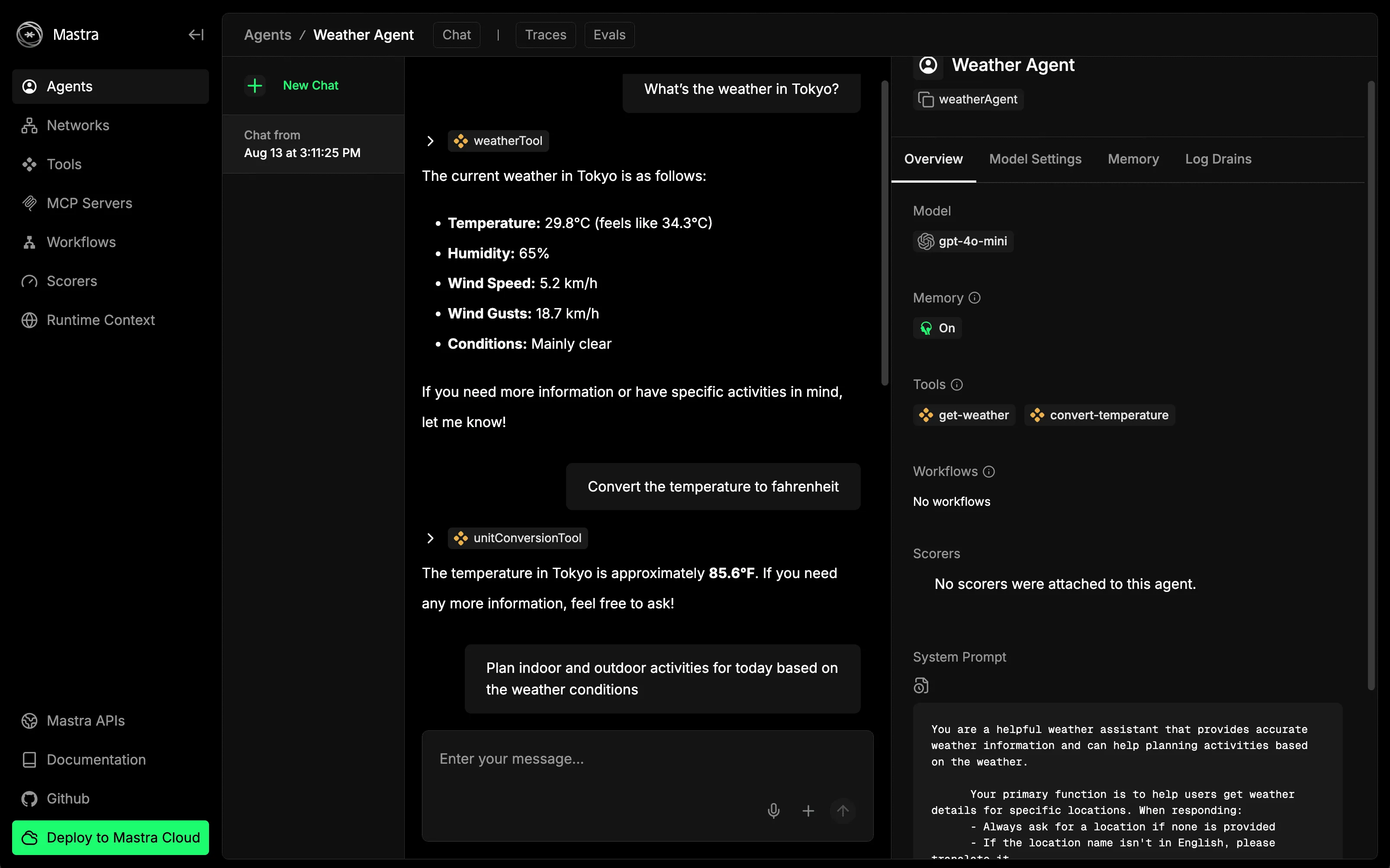
エージェントパネルで試すプロンプト例:
- "What's the weather in Tokyo?"
- "Convert the temperature to fahrenheit"
- "Plan indoor and outdoor activities for today based on the weather conditions"
エージェントから構造化されたアクティビティプランがストリーミングされるはずです。
次に進むべき道
- 予報ツールを追加し、降水量確率でワークフローを分岐させる
@mastra/loggersでカスタムテレメトリをログ出力- ロケーション固有の会場向けにRAGを追加
- レスポンスがフォーマットに従うことを確認する評価を書く
このリポジトリは、エージェント、ツール、ワークフロー、メモリを、成長可能な小さくても現実的な例で実演しています。